Project Overview
This workshop is a hands-on walkthrough of implementing a three-tier web architecture in AWS. I created the necessary network, security, application, and database components and configurations to run this architecture in an available and scalable manner.
Architecture Summary: A public-facing Application Load Balancer forwards client traffic to web tier EC2 instances running Nginx webservers. The web tier serves a React.js website and redirects API calls to an internal load balancer for the application tier (Node.js). The application tier manipulates data in an Aurora MySQL multi-AZ database. Load balancing, health checks and autoscaling groups maintain availability at each layer.
Architecture Diagram
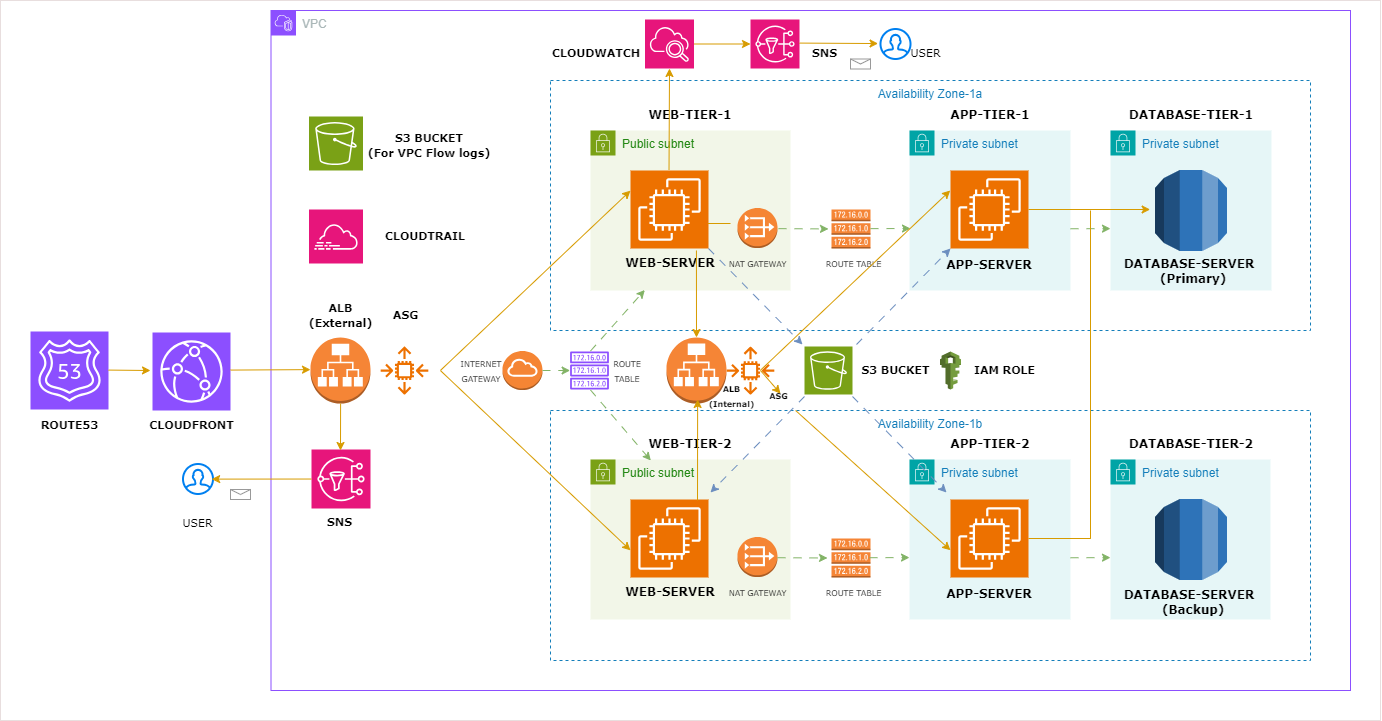
Three-tier web architecture with public and private subnets
Implementation Steps
Download Code & Create S3 Buckets
Download code from GitHub and create two S3 buckets: one for storing web-server & app-server code, and another for VPC flow logs.
Create IAM Role with Policies
Create IAM role with S3 read-only and SSM managed instance core policies for EC2 instances.
Create VPC with Networking Components
Create VPC with public and private subnets, Internet Gateway, NAT Gateway, Route Tables. Enable auto-assign public IP for web-tier public subnets and create VPC flow logs.
Create Security Groups
Create security groups for each tier with appropriate ingress rules:
| Security Group | Protocol/Port | Source |
|---|---|---|
| External-Load-Balancer-SG | HTTP (80) | 0.0.0.0/0 |
| Web-Tier-SG | HTTP (80) | External-LB-SG |
| Internal-Load-Balancer-SG | HTTP (80) | Web-Tier-SG |
| App-Tier-SG | Port 4000 | Internal-LB-SG |
| DB-Tier-SG | MySQL (3306) | App-Tier-SG |
Create Database Tier
Create DB subnet group and RDS Aurora MySQL multi-AZ database placed in private subnets.
Create Application Tier
Create test app server (Node.js), install packages, test connections, create AMI, launch template, target group, internal load balancer, and autoscaling group.
Create Web Tier
Create test web server with Nginx and Node.js (React), install packages, test connections, create AMI, launch template, target group, external load balancer, and autoscaling group.
Add DNS & Monitoring
Add external ALB DNS record in Route 53, create CloudWatch alarms with SNS, and set up CloudTrail for auditing.